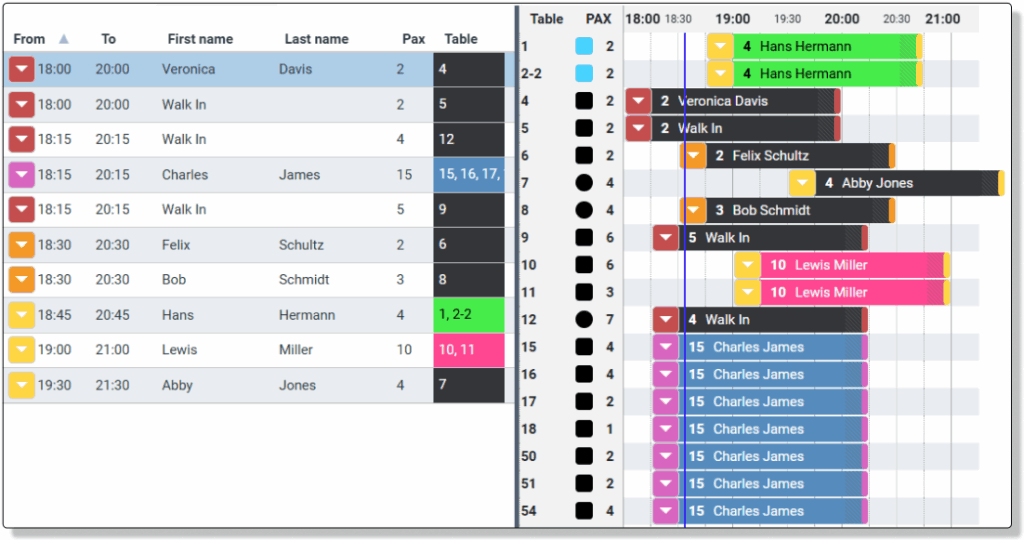
Manage you booking during service, by setting booking status.
On the day of the booking, a Booking Status will appear next to the arrival time in the booking list, and in the start of the booking in the Time Plan (Optional). Set the booking Status here, when the booking shows up and when they leave the table. The functions can also be accessed in the lower left corner of Day View.
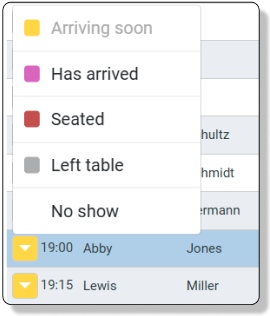
Click on the icon to open and set the booking status
Arriving Soon: The booking is about to start
Booking Started: The booking is started, but no status has been set
HasArrived: The guests have arrived in the restaurant, but not seated at the table yet. Perhaps they are having a drink in bar, or waiting for the rest of the table
Seated: The guests are seated at the table
Left Table: The guests have left the table, and the table is now available for new bookings
No show: The guests has not turned up for their booking. Marking the booking No show, will add info to the Guest History, and make the table available for new bookings.